Why a 200 Proves Less Than You Think
Thinking like an API tester, whichever tool you use
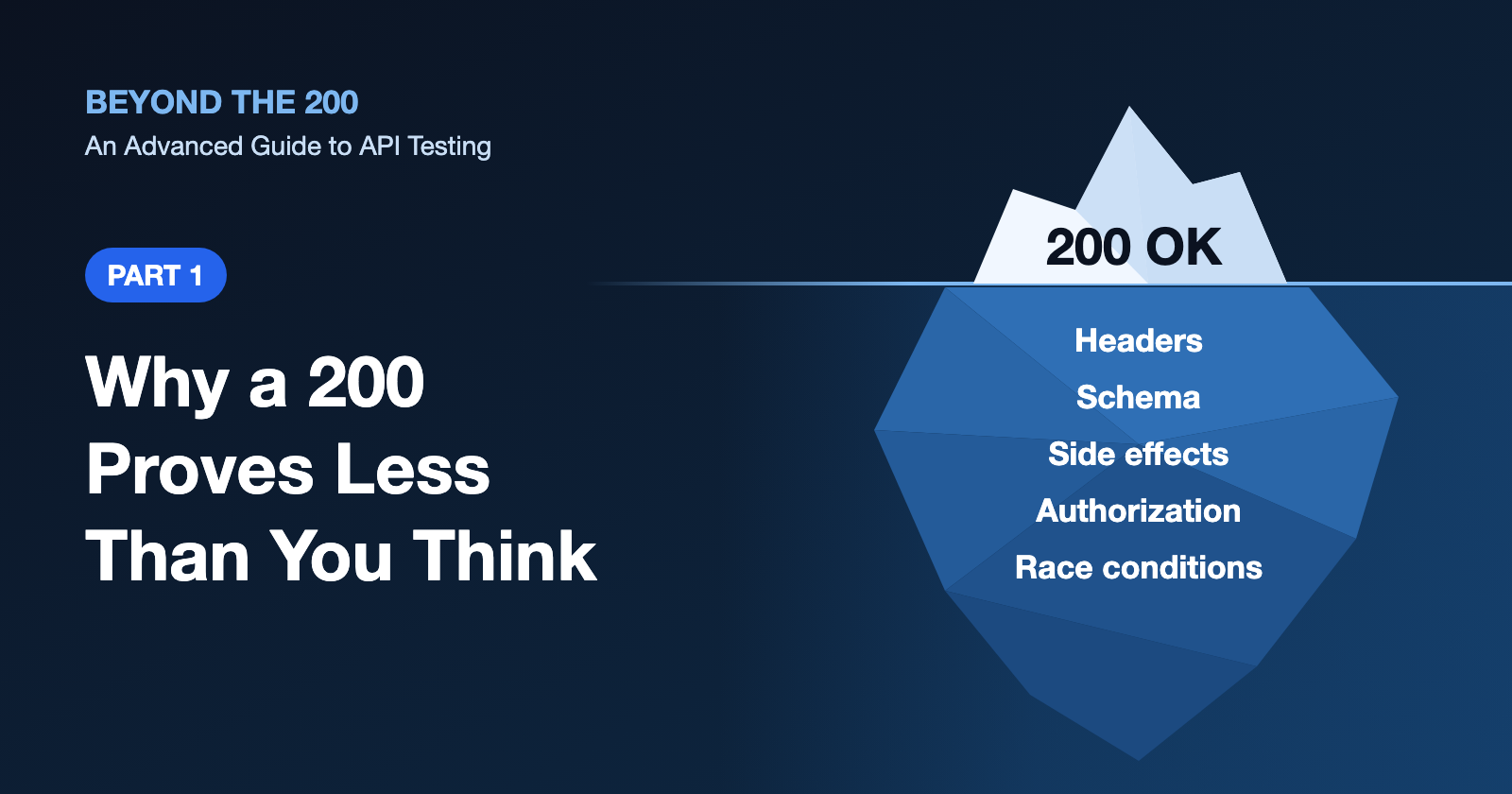
You send a request. You get a 200. The test goes green, and everyone moves on.
That 200 tells you the server had no complaint about how the conversation went. It doesn't tell you the data was saved, that the right person got it, or that nothing else broke along the way. Most of what makes a strong API tester lives in the gap between "it returned 200" and "it did the right thing".
This is the first part of Beyond the 200: An Advanced Guide to API Testing, a four-part series for testers who can already send a request and want to get properly good at this. We'll start with thinking, not tools. Some of this part revisits ground you may know, such as status codes and HTTP methods, but it goes deeper than the usual definitions, and the later parts build on it. By the end of this part you'll know what to test on any endpoint and why, whether you work in Postman, REST Assured, Playwright or plain curl.
Before you start
You should already be comfortable sending requests, reading JSON and checking a status code. You don't need to write code for this part.
The examples use an imaginary online bookshop API. It isn't real, and every request and response here is an illustration. The ideas carry over to whatever API you test.
HTTP semantics in depth
You know the methods and the common status codes. So let's look at what they actually promise, because that's where the test ideas are hiding.
Safe and idempotent methods
A safe method is one that's meant to be read-only. GET, HEAD and OPTIONS are safe (so is TRACE, though you'll rarely see it enabled). Calling them shouldn't change anything the client cares about. A server can still write a log line or bump a counter. What it can't do is cancel your order.
An idempotent method is one where sending the same request many times has the same intended effect on the server as sending it once. PUT and DELETE are idempotent, and so is every safe method. POST isn't. PATCH isn't by default, but a particular PATCH can be. Setting a price to 12 is idempotent. Adding 1 to a stock count isn't.
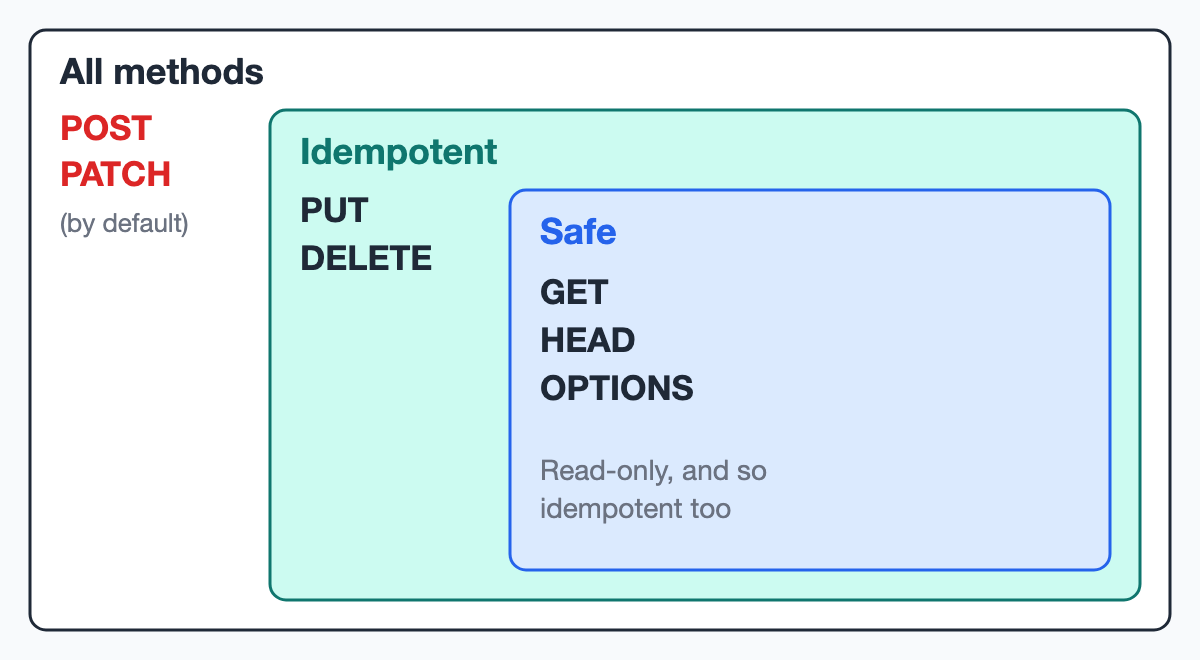
Why should a tester care? Because networks fail. If a client sends a request and the connection drops, it can't know whether the server got it. With an idempotent method it can simply try again. With POST, a retry might place a second order.
Here's how the promises usually line up. Two success codes in the table may be new to you. 201 Created means a new resource now exists, and the response often says where in a Location header. 204 No Content means the request worked and there's deliberately no response body.
| Method | Safe? | Idempotent? | Typical success status |
|---|---|---|---|
GET |
Yes | Yes | 200 |
HEAD |
Yes | Yes | 200, no body |
OPTIONS |
Yes | Yes | 200 or 204 |
PUT |
No | Yes | 200, 204 or 201 |
DELETE |
No | Yes | 200 or 204 |
POST |
No | No | 200 or 201 |
PATCH |
No | Not by default | 200 or 204 |
Now the part that trips people up. Idempotent describes the effect on the server, not the response. For example, imagine deleting a book twice:
DELETE /books/42 → 204 No Content
DELETE /books/42 → 404 Not Found
Different responses, same end state. The book is gone either way, so this is perfectly idempotent.
⚠️ Common mistakes
- Asserting that a repeated
DELETEreturns the same status. A404the second time is normal.- Assuming a method keeps its promise because the standard says so. These are promises, and servers can break them. A
GET /orders/42/cancellink is a bug waiting to be crawled.
Test ideas you can use tomorrow:
- Call a
GETtwice, and check nothing changed between the calls. - Send the same
PUTtwice, then read the resource and compare it with the state after the first call. - Send the same
POSTtwice, and decide with your team what should happen. Two orders might be a defect.
💡 Expert tip
When you compare state after a repeated
PUT, leave out fields likeupdated_at. A changed timestamp usually isn't a broken promise, and a test that trips on it teaches people to ignore your failures. Compare the fields that carry business meaning.Idempotent also doesn't mean safe under concurrency, which is when two or more requests are handled at the same time. If two users each
PUTa different price at the same moment, both requests are idempotent, but one silently overwrites the other. We'll test that in Part 4.
The status codes people confuse
Most confusion comes down to a few pairs. The chart below shows the questions a server typically asks, and which answer each code gives. Treat the order as typical rather than a rule, because frameworks differ. Some validate the input before they look up the record, for example.
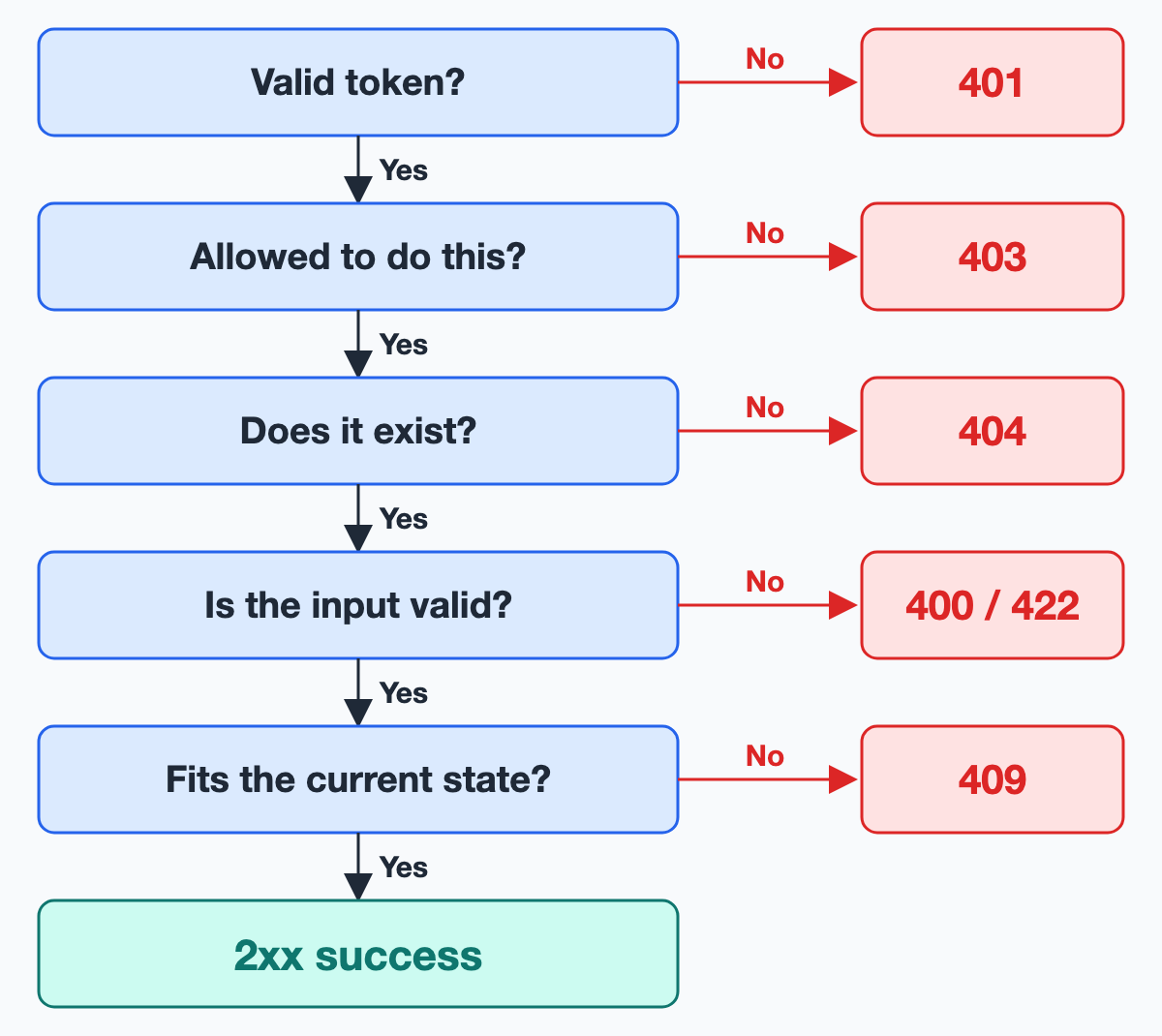
401 vs 403. Two terms first. Authentication is proving who you are. Authorization is deciding what you're allowed to do. A 401 Unauthorized is really about authentication, despite its name. It means "I don't know who you are", usually because the token is missing, expired or invalid. A 403 Forbidden means the server understood the request and refuses to carry it out. In API testing, that's usually "I know who you are, and the answer is no". A customer calling an admin endpoint should get 403. The same call with no token at all should get 401. A 403 doesn't always involve a login, though, because rules like an IP block can return it too.
The standard also says a 401 must include a WWW-Authenticate header telling the client how to authenticate. Plenty of APIs leave it out. That's a real, if minor, finding.
403 vs 404. If I ask for your order, should the server say 403 or 404? The HTTP standard lets a server answer 404 to hide that something exists. Both are defensible, so what matters is that nothing leaks and that the API is consistent. We'll come back to this in Part 3.
💡 Expert tip
Compare the response for someone else's record with the response for a record that doesn't exist. If one says
403and the other404, any logged-in user can work out which IDs are real, even though neither response shows any data.
400 vs 422. A 400 Bad Request is the broad "I can't process this" code, typically for something malformed, like broken JSON. A 422 Unprocessable Content means the syntax was fine but the content made no sense, like a quantity of -1. You'll also see it called Unprocessable Entity, its older name. Many good APIs use 400 for both, and that's allowed. Check the documented convention, then check the API follows it everywhere.
409 vs 422. A 409 Conflict means the request clashes with the current state of the resource, in a way the client may be able to fix. An email that's already registered is the classic case. Here's my opinion, and it's only that. If the request is fine in itself and only clashes with what the server holds right now, I lean towards 409. If it's wrong whatever the server holds, 422. Teams land on both, so don't file a bug without a documented rule behind it.
404 vs 410. A 410 Gone says the resource was here and it's probably gone for good. If the server can't tell, the standard says to use 404. Most APIs never send 410, so only expect it if the documentation promises it.
423 and 429. A 423 Locked comes from WebDAV, a file-editing extension of HTTP. Some APIs borrow it for locked accounts. A 429 Too Many Requests means you've gone over a rate limit, which is a cap on how many requests a client may send in a period. It may come with a Retry-After header saying how long to wait, in seconds or as a date. The standard makes that header optional, so a missing one is a usability suggestion rather than a violation. It's still very useful to clients that want to back off politely, so I'd raise it.
💡 Expert tip
Read error bodies as carefully as success bodies. I've seen a duplicate email come back as a
403with a raw database error inside. The status pointed at permissions, and the real cause was a failed uniqueness check. A plausible code can hide a bug that a quick glance won't catch.
⚠️ Common mistakes
- Treating a
500as a pass for a negative test because "it failed, like I expected". Bad input should never crash the server. A500for an unknown ID is a bug, not a refusal.- Asserting "any 4xx". It'd pass if a permissions bug turned your validation error into a
403.
Headers that matter
Headers are where a lot of an API's real behaviour sits, and they're easy to skip because most tools show you the body first.
Accept and Content-Type. Accept is the format the client wants back. Content-Type says what format a body is actually in, on a request or a response. The process of client and server settling on a format is called content negotiation. For example:
POST /orders
Content-Type: application/xml
Accept: application/json

→ 415 Unsupported Media Type
A 415 means the server won't take that request format. A 406 Not Acceptable means it can't produce the format you asked for, although servers are allowed to ignore Accept and send their default instead. So check what's documented. Also check the Content-Type on error responses. An API can return tidy JSON on success and an HTML error page when a server in front of it fails, and clients often choke on that.
Caching headers. Cache-Control tells clients, and any servers in between, whether they may store a response and for how long. An ETag is a version label for the data in a response. Once its stored copy is out of date, a client can send the label back in If-None-Match to ask whether anything changed:
GET /books/42
→ 200 OK
  ETag: "v7"
  Cache-Control: max-age=60

GET /books/42
If-None-Match: "v7"
→ 304 Not Modified
A 304 means "what you have is still current", and there's no body. If the API supports ETags, good tests are easy to state. When an update changes what GET returns, a strong ETag changes too, and a matching If-None-Match should give a 304. A weak ETag, marked with a W/ prefix, might stay the same across changes the server treats as equivalent, so check which kind you're testing. For any API, a response holding one user's data must not be stored in a shared cache, meaning one that serves many users. Look for private or no-store.
🧪 Try it
Pick three responses from an API you have access to, one success and two errors. Read every header. Write down one header you'd assert on and one you can't explain yet.
Test design for APIs
Knowing the protocol tells you what the API promises. Test design tells you which inputs are worth your time, because you'll never try them all.
Equivalence partitioning and boundaries
Equivalence partitioning means splitting inputs into groups the system should treat the same way, then testing one value from each. Boundary value analysis means testing at the edges of those groups, because that's where off-by-one mistakes live. Both are classic techniques, and they fit APIs particularly well.
For example, imagine adding to a cart, where quantity must be a whole number from 1 to 99:
| Partition | Values to try | Expected |
|---|---|---|
| Below the range | 0, -1 |
Refused |
| In the range | 1, 50, 99 |
Accepted |
| Above the range | 100 |
Refused |
| Wrong type | "two", 1.5, true, [] |
Refused |
| Missing or empty | field left out, null, "" |
Refused, or a documented default |
The last two rows are what make APIs different from a form in a browser. A UI stops a user typing [] into a number box. An API receives whatever the client sends, so the server has to do that checking itself.
Missing, null and empty are three separate cases, and servers often treat them differently. Also try a number sent as a string ("5"), fields you weren't expected to send, and values that are the right type but far too long. If a name allows 120 characters, try 120 and 121.
💡 Expert tip
Don't count on random data to find your edges. A randomised test over a wide range might never send exactly
100. Pin the boundaries as fixed test cases, and let randomness explore the space between them. We'll look at that in Part 4.
Negative testing
Negative testing means checking how the system handles input it should refuse. For APIs it deserves as much attention as the happy path, because every client bug and every attacker ends up here.
A good negative test checks more than the code. A proper refusal has four parts:
- The exact status you expected.
- An error that's as helpful as is safe. A validation error should name the field, so a client developer can fix it. Login, password-reset and access errors may stay vague on purpose, so they don't reveal which accounts or records exist.
- No internal details, such as code paths or database queries.
- No business change. The record you tried to create or change stays as it was. Security records are the exception, because a failed login still has to count towards a lockout, and rate limits and audit logs may update too.
For example:
POST /cart/items
{ "book_id": "b-17", "quantity": 0 }

→ 422 Unprocessable Content
{ "errors": { "quantity": ["Must be between 1 and 99"] } }
Then read the cart and confirm it hasn't changed. That last step is the one people skip.
✅ Best practices
- Change one thing at a time. If a request has two invalid fields, you can't tell which one caused the refusal.
- Assert which field the error names. A
422about the wrong field means the rule you meant to test never ran.
State transitions
State transition testing looks at how something moves between statuses, and which moves should be impossible. Many interesting API bugs aren't about a single request. They're about a request arriving at the wrong moment.
For example, imagine an order that goes from PENDING to PAID to SHIPPED to DELIVERED, and that can be cancelled until it ships:
| From | Action | Expected |
|---|---|---|
PENDING |
Pay | Becomes PAID |
PAID |
Pay again | Refused with 409, charged once |
PAID |
Cancel | Becomes CANCELLED |
SHIPPED |
Cancel | Refused with 409 |
CANCELLED |
Ship | Refused with 409 |
Happy-path tests often stop at the first row. The refused moves are where defects tend to hide.
Logins have states too, which makes them a great place to practise. Say three failed attempts lock an account. Test that the third failure locks it, and that a locked account refuses the correct password. Then test what resets the count. If a good login is meant to clear it, fail twice, succeed, and fail twice more. The account should still be open. Testers often stop before that one.
🧪 Try it
Choose one resource with a status field in an API you're allowed to test. Draw its states on paper, then list every move that should be impossible. How many have a test?
Testing pagination, filtering and sorting
List endpoints look simple, and they're where a lot of quiet bugs live. Few people click through to page 40.
Offset pagination asks for a position, as in ?page=3&per_page=20. It's easy to use and lets you jump anywhere. Cursor pagination gives you an opaque marker with each page, and you send it back to get the next one, as in ?cursor=eyJpZCI6NDJ9. You can't jump to page 40, but it holds its place far better.
The weakness of offsets is that the data can move while you're reading it. If something new lands on page 1 between your two requests, everything shifts along by one, and the last item from page 1 shows up again on page 2. A deletion does the opposite, and an item gets skipped.
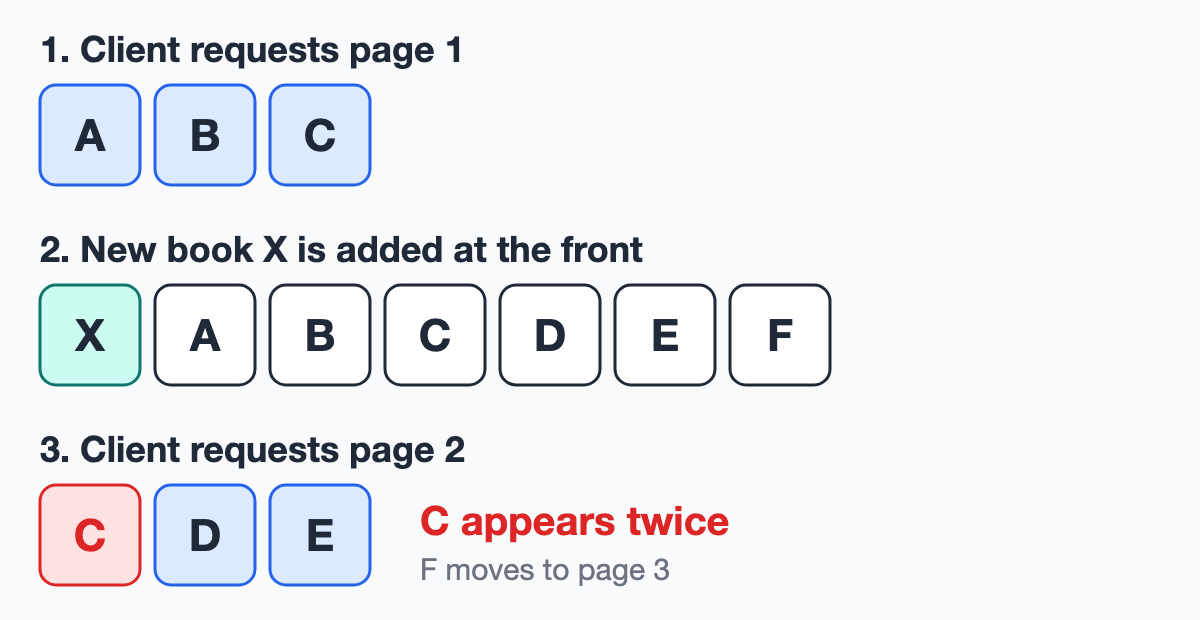
That's normal behaviour for offsets, not a defect. It's still worth knowing, because it explains both odd reports from users and odd failures in your tests.
Test ideas for pagination:
- Request the first page, the last page and a page past the end. Past the end usually gives an empty list, but it might be a
404. Check what's documented. - Try
page=0,page=-1,page=abc, a page size of0and one above the maximum. - Walk every page while the data isn't changing. No item should repeat or go missing, and the count should equal the reported total.
- Check an empty result set. What do
totalandlast_pagesay when nothing matches? - For cursors, try a garbled cursor, and a valid one reused with a different filter.
Sorting needs its own care. Check the whole order rather than just the first item, in both directions. Try items with equal values too. If twenty books cost the same and the API has no tie-breaker, their order can change between requests, so one book can appear on two pages and another on none. Decide how null values should sort, and whether upper and lower case are treated the same.
For filters, check that every returned item matches, that combined filters narrow the results, and what an unknown filter value does. Then combine all three. Filter, sort and paginate in one request, because that's what real clients do, and it's where the query gets complicated.
⚠️ Common mistakes
A test that says "every item in the list matches the filter" passes on an empty list. So make sure matching data exists before you run it, and assert that the list isn't empty.
💡 Expert tip
Testing "a page past the end" on a shared environment? Don't ask for
last_page + 1. Another test can add enough data between your two calls to make that a real page. Ask for something far beyond the end, and the check stops depending on timing.
What to assert
Now we can come back to that 200. A response has several parts, and the most important result often isn't in the response at all.
A side effect is any change beyond the response itself, such as a stored record, reduced stock or a sent email. A schema is a description of the shape of the data, meaning which fields exist and what type each one is. Part 2 goes into schemas properly.
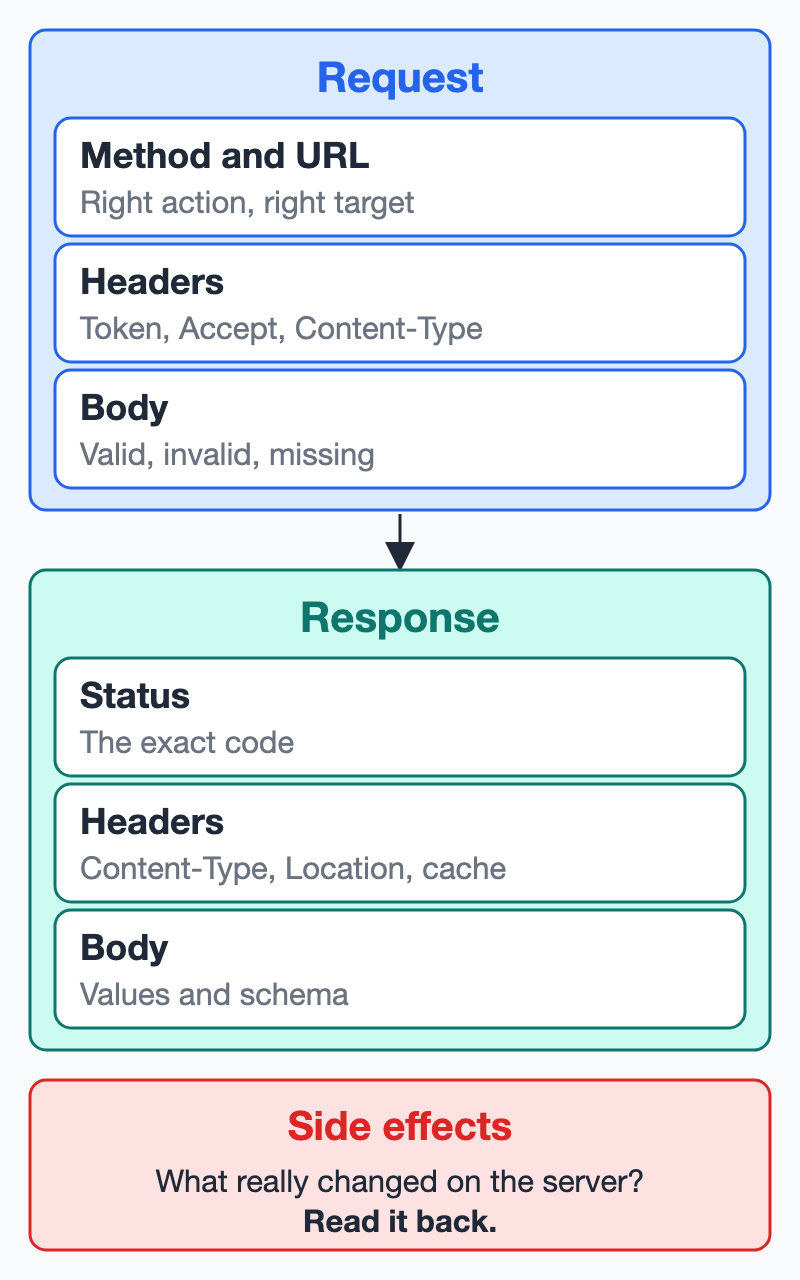
| Layer | The question | Example |
|---|---|---|
| Status | Is it exactly the code we expect? | 201, not just "a 2xx" |
| Body | Are the values right? | The total is the sum of the items |
| Schema | Is the shape right? | total is a number, not a string |
| Headers | Is the metadata right? | Location points at the new order |
| Side effects | Did the right thing really happen? | Stock went down by exactly one |
The check most tests leave out is read-back verification, which means confirming a write with a separate request instead of trusting the response to it. A success status only tells you what the server claims. For example:
DELETE /wishlist/9 → 204 No Content
GET /wishlist/9 → 200 OK
The delete reported success, and the item's still there.
💡 Expert tip
I've seen a
204that deleted nothing. One customer tried to delete another customer's item. The server filtered the delete by owner, matched no row and reported success anyway. The status said the delete had worked, and only a read-back showed the item was safe. So a refused write deserves a read-back as much as a successful one.
The idea looks much the same in any tool. In Postman, you could write this in a test script:
pm.test("order is created", () => {
  pm.response.to.have.status(201);
  pm.expect(pm.response.headers.get("Location")).to.include("/orders/");
  pm.expect(pm.response.json().total).to.eql(24.5);
});
In REST Assured, the same checks read like this:
given().spec(customer).body(order)
.when().post("/orders")
.then().statusCode(201)
  .header("Location", containsString("/orders/"))
  .body("total", equalTo(24.5f));
You don't need all five layers on every test. A quick check that the basics work can stay light. But for anything that writes data, ask what would still pass if the write silently did nothing. If the answer is "this test", add a read-back.
✅ Best practices
- Assert the exact status. A loose check hides a change in behaviour.
- Check calculated values, not just that a field exists. A field can be present and wrong.
- Read back every important write, because the response only reports what the server believes happened.
🧪 Try it
Take one test you already have that writes data. Imagine the server skipped the write but still answered with success. Would any assertion notice? If not, add a read-back.
Recap
- Safe and idempotent are promises about effects on the server, not about matching responses.
- Most status code confusion comes down to a few pairs, and the API's documented convention often matters more than the "right" answer.
- Headers carry real behaviour, so read them.
- Partitions and boundaries pick your inputs, and missing,
nulland empty are different cases. - A good refusal has the right code, a useful error, no internals and no business change.
- Many bugs live in impossible state moves and in the far pages of a list.
- Status is one of five things to check, and for writes, the read-back often matters most.
Next, in Part 2, we'll look at what happens when the response looks fine and still isn't. We'll cover how schemas, contracts and specs differ, how to manage test data, and how to keep tests reliable when they run side by side.
What's the strangest status code you've seen an API return for a perfectly ordinary mistake? I'd love to hear it in the comments.
References
- RFC 9110: HTTP Semantics. Methods (section 9), status codes (section 15), content negotiation (section 12), conditional requests (section 13).
- RFC 9111: HTTP Caching.
- RFC 5789: PATCH Method for HTTP. Why
PATCHisn't idempotent by default. - RFC 6585: Additional HTTP Status Codes. Defines
429. - RFC 4918: HTTP Extensions for WebDAV. Defines
423. - ISTQB Glossary. Standard definitions of equivalence partitioning, boundary value analysis and state transition testing.
Comments
Join the discussionGreat framing. GraphQL is a good example of exactly this: with the usual application/json responses, many servers answer 200 even when the query failed, and the real result is an "errors" array next to (or instead of) "data". Partial success is allowed too, so one response can carry some fields and an error for others. A habit that helps: assert that "errors" is absent, or exactly what you expected, before you look at the data. Will a later part of the series cover GraphQL or JSON-RPC, where the status code says even less?
Thanks, and that's a great example. GraphQL does come up in Part 3, where I want to look at why rules enforced on REST also have to hold on other entry points. A refused GraphQL request answering 200 is exactly the kind of trap I want to cover there. Have you found a good way to assert on partial success? I'm curious whether you check the exact errors content or only that the failed fields are the ones you expected
Looking forward to Part 3. That entry-point angle is a good one: a permission rule that's enforced on the REST route but not on the matching GraphQL field or mutation is an easy gap to miss, and when the refusal comes back as a 200 with an error inside, a status check won't notice it either. Thanks for writing the series.
Beyond the 200: An Advanced Guide to API Testing.
A 200 tells you far less than most tests assume. This four-part series goes beyond status codes to show what strong API testers check and why. It covers test design, contracts and test data, security testing with the OWASP API Security Top 10, and robustness under concurrency and delay. The ideas work in any tool, from Postman to REST Assured to Playwright.